How to Stop Excessive Temu Emails and Manage App Notifications

By Trae Jacobs,

When you buy through our links, we may earn an affiliate commission.
Your inbox is flooded with Temu marketing emails. You can adjust your settings to stop these messages immediately.
- Open the Temu app on your device and dismiss any pop-up ads [0:23].
- Tap the U icon in the bottom navigation menu [0:33].
- Select the hexagon settings icon located in the top right corner [0:38].
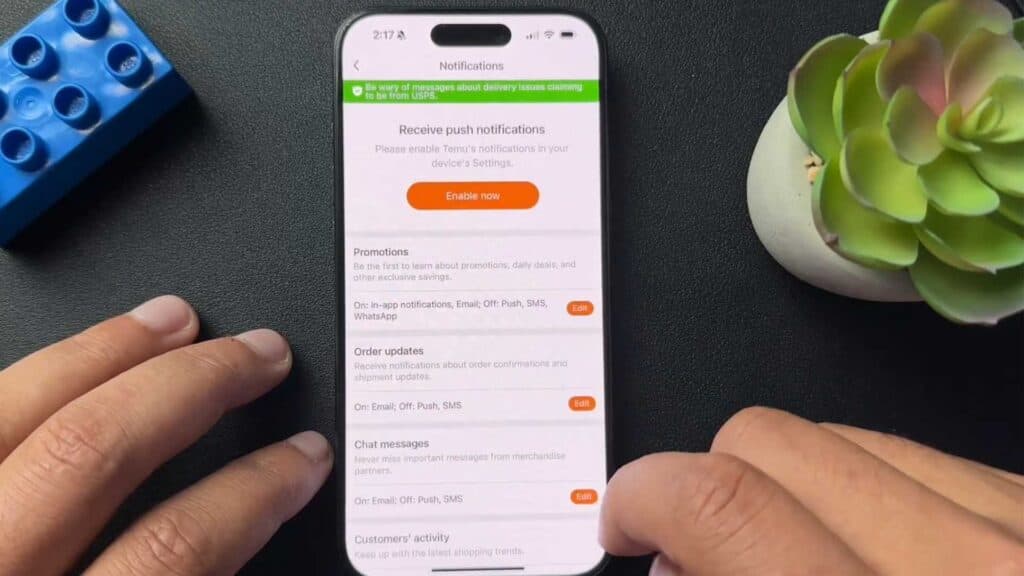
- Open the Notifications menu to view your alert settings [0:49].
- Tap the Edit button next to Promotions and disable the email notification toggle [0:58].
- Turn off order updates and messages if you want to limit all communication from the app.
- Toggle off the option to share your avatar and username when adding items to your cart.
Ninja Tip: You can also mark Temu emails as spam in your email provider’s settings to ensure they bypass your inbox entirely even if the app continues to send them.
If the notifications persist, you can remove your account entirely by going to Settings > Security > Delete your Temu account.
Keep Reading