How to Connect Your Apple TV to a Mobile Hotspot

By Trae Jacobs,

When you buy through our links, we may earn an affiliate commission.
Your Apple TV currently lacks a connection to the internet because you do not have access to traditional Wi-Fi. You can resolve this by connecting your device directly to your smartphone’s personal hotspot.
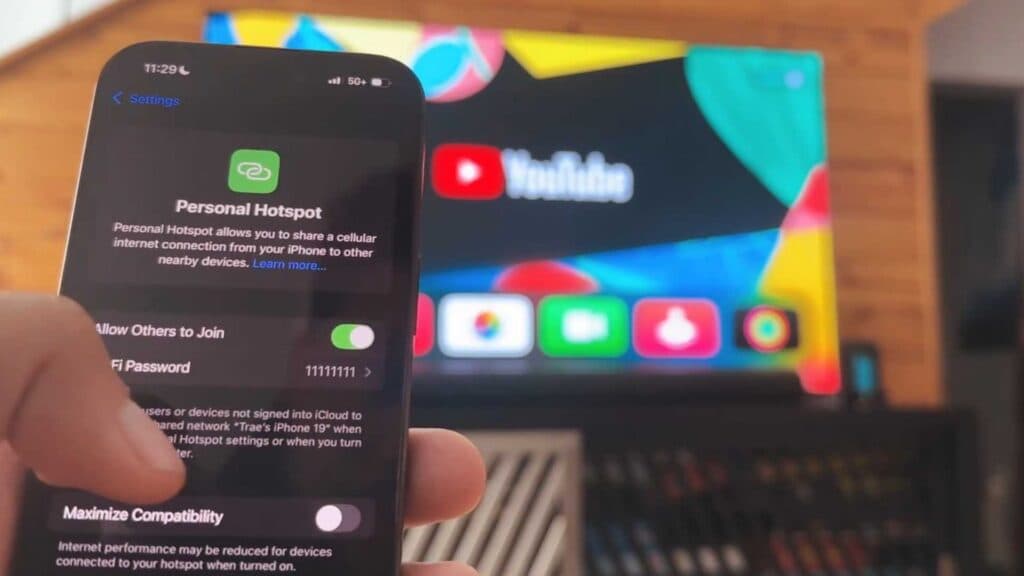
- Open the Settings menu on your phone, navigate to Personal Hotspot, and ensure Allow Others to Join is enabled so you can see the Wi-Fi password [0:16].
- Go to the Settings app on your Apple TV, select Network, and then choose Wi-Fi to see a list of available connections [0:40].
- Select Maximize Compatibility in your phone’s hotspot settings to ensure a stable and reliable connection [0:57].
- Select your phone from the list of available networks on your Apple TV and enter the Wi-Fi password when prompted.
Ninja Tip: If your Apple TV still struggles to connect, rename your phone to something simple with no special characters or spaces in the Settings > General > About menu, as some older devices have trouble recognizing complex network names.
If you still cannot establish a connection, try a network reset by navigating to Settings > System > Reset > Reset Network Settings.
Keep Reading