How to Change the Sleep Timer on Apple TV

By Trae Jacobs,

When you buy through our links, we may earn an affiliate commission.
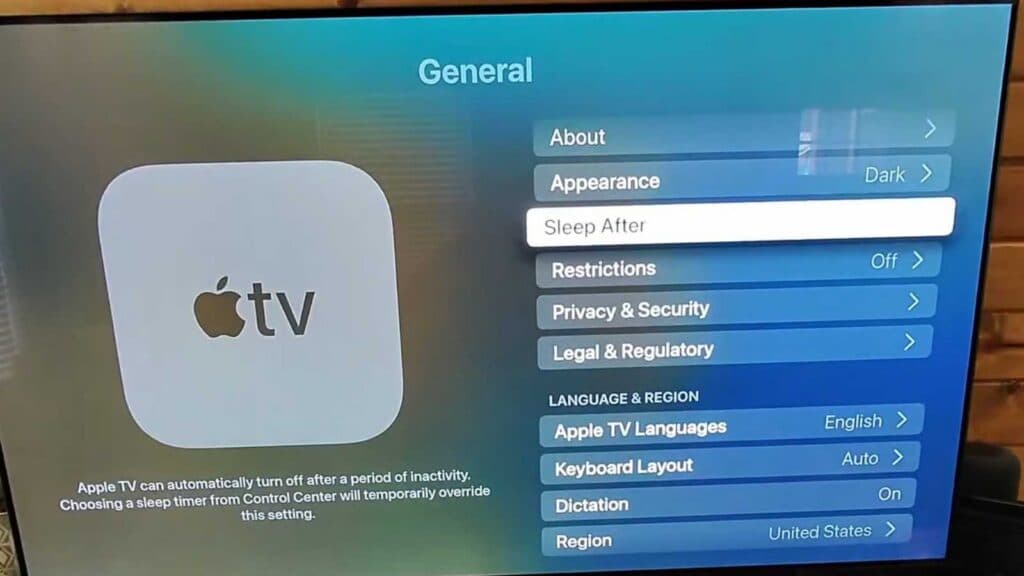
Your Apple TV turns off or goes to sleep after a set period of inactivity. You can easily adjust this timing to better suit your needs.
- Open the Settings app on your Apple TV home screen [0:30].
- Select the General menu [0:34].
- Scroll down and select “Sleep After” to view your current timing settings [0:42].
- Select your preferred time increment from the list, or choose “Never” to keep it on indefinitely.
Ninja Tip: If you own an OLED display, ensure your Screen Saver start time is also set to a short interval, such as 2 minutes, via Settings > General > Screen Saver to further protect your pixels.
If you encounter persistent power issues, you can reset the device by going to Settings > System > Reset.
Keep Reading