Title: How to Automatically Share Instagram Posts, Stories, and Reels to Facebook

By Trae Jacobs,

When you buy through our links, we may earn an affiliate commission.
Intro: You currently manually upload your content to both Instagram and Facebook every time you post. You can automate this process so your content publishes to both platforms at the same time.
Steps:
- Open your Instagram profile by tapping your picture in the bottom right corner and selecting the three lines in the top right to reach your settings [0:18].
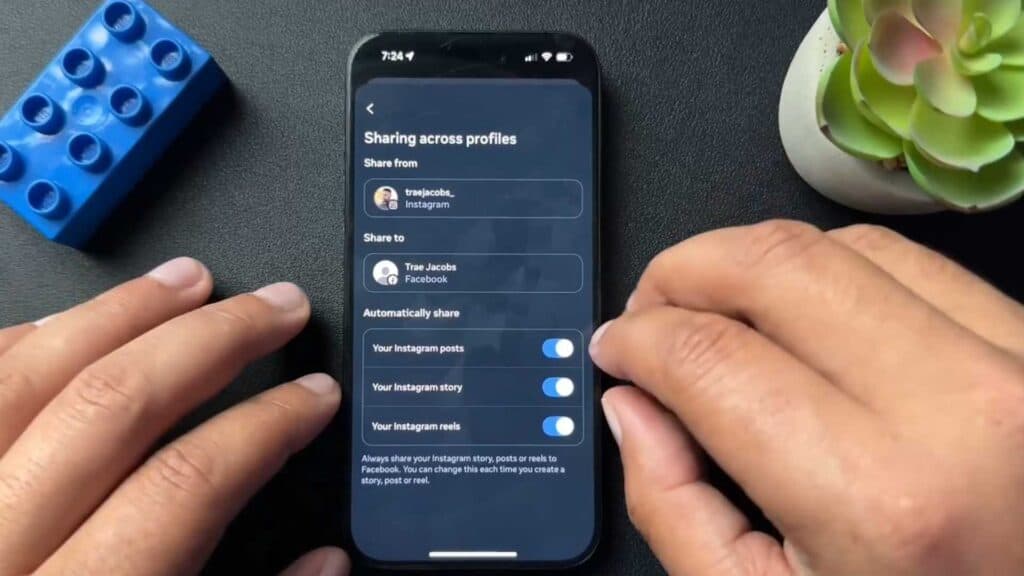
- Navigate to the Account Center and select Sharing across profiles to choose your Instagram account as the source for your posts [0:28].
- Select your linked Facebook page and toggle on the types of content, such as posts, stories, or reels, that you want to share automatically [0:47].
- To share content to other apps like WhatsApp or Threads, go back to your settings and scroll down to the Sharing and reuse section.
- Select your desired app and follow the prompts to connect those accounts for cross-platform posting.
Ninja Tip: If your posts are not syncing, ensure that your Instagram and Facebook accounts are linked within the same Meta Accounts Center dashboard. Removing and re-adding your accounts in the Meta Accounts Center often resolves persistent syncing errors.
Closing: If the connection continues to fail, you can clear the app’s cache through your phone’s Settings > Apps > Instagram > Storage > Clear Cache.
Keep Reading


