How to Verify if an Amazon Product is Actually on Sale

By Trae Jacobs,

When you buy through our links, we may earn an affiliate commission.
Amazon sellers frequently inflate prices before applying a discount to make items appear like a better deal. You can use a free tool to check the actual price history and ensure you are paying the lowest amount.
- Copy the product link from the Amazon page for the item you are viewing. [1:10]
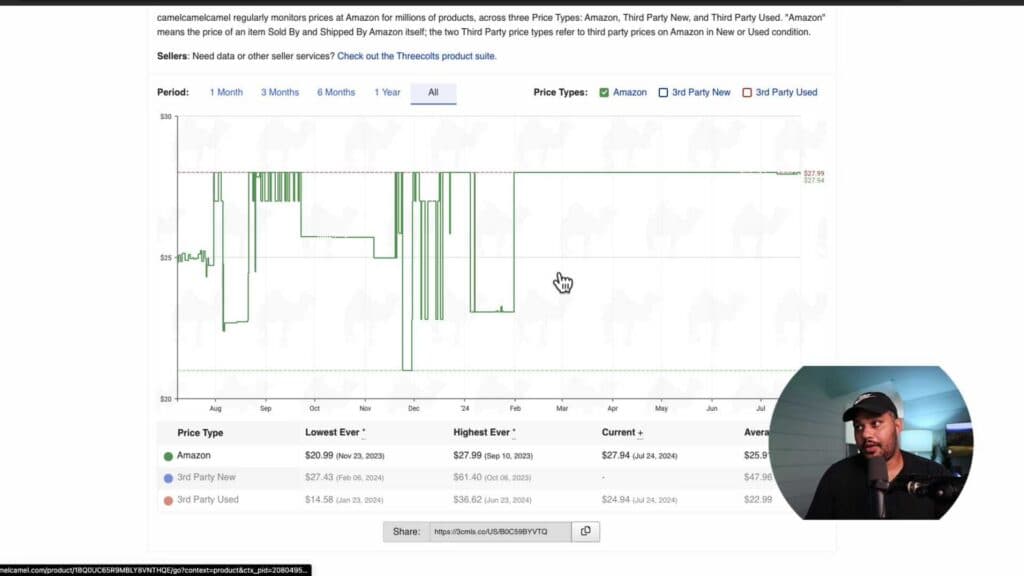
- Navigate to CamelCamelCamel.com and paste the copied link into the search bar to see the historical price data. [1:16]
- Review the price chart to determine if the current cost matches the lowest price historically offered on the platform. [1:36]
- Create a price watch by entering your email address to receive an alert when the item drops to your desired price target. [2:22]
Ninja Tip: Install the Camelizer browser extension to check price history directly on the Amazon product page without needing to copy and paste links manually.
If you still find the pricing or performance of your Amazon account settings to be incorrect, you can clear your browser’s cache via Settings > Privacy and security > Clear browsing data.
Keep Reading



