How to Use the Yoga Sleep Sound Machine

By Trae Jacobs,

When you buy through our links, we may earn an affiliate commission.
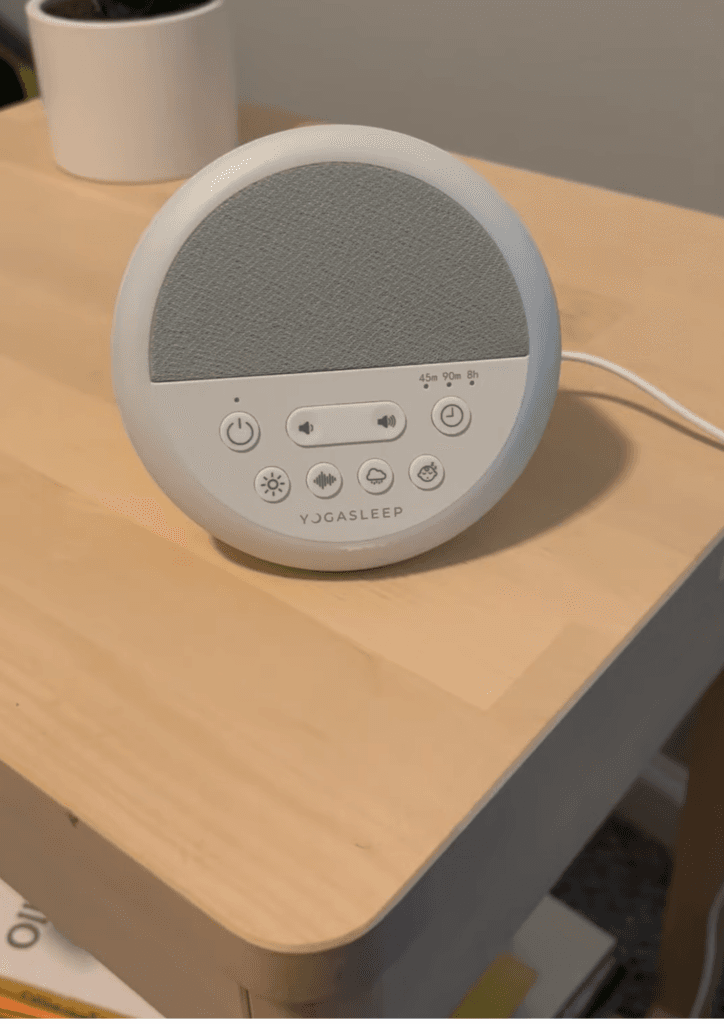
White noise devices help your baby sleep, but navigating the settings can be unclear. Follow this guide to operate your Yoga sound machine effectively.
- Press the power button to turn the machine on and begin playing the default white noise [0:22].
- Toggle through the different white noise sounds until you reach the nature sounds category [0:47].
- Cycle past the nature sounds to access the lullaby options [0:58].
- Use the light control button to turn the device’s illumination on or off [1:05].
- Press the timer button to cycle through the available intervals of 45 minutes, 90 minutes, or 8 hours [1:11].
- Connect the device to a power source using the included USB-A cable.
Ninja Tip: Keep the sound machine at least six feet away from the crib or bassinet to ensure the sound levels remain safe for your baby’s developing hearing.
If the device fails to turn on after being plugged in, perform a hard reset by disconnecting the cable for ten seconds before plugging it back into a known working power source.
Keep Reading


