How to Turn Off Voice Guide on Samsung TV

By Trae Jacobs,

When you buy through our links, we may earn an affiliate commission.
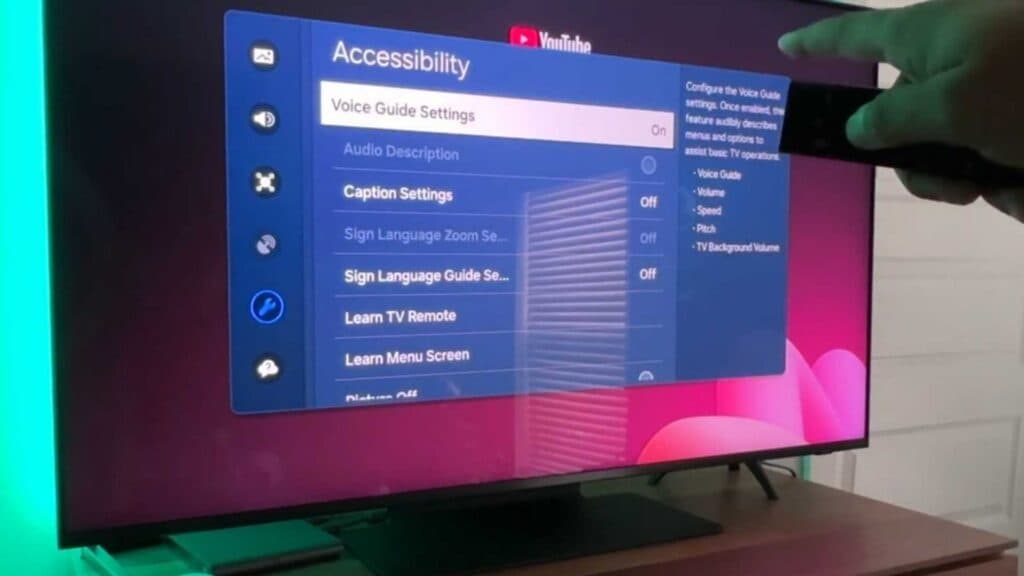
Your Samsung TV is narrating everything currently on the screen. You can disable this Voice Guide feature through your settings menu.
- Open your TV settings and navigate to the All Settings menu. [0:24]
- Select General & Privacy from the list. [0:37]
- Open the Accessibility menu. [0:42]
- Select Voice Guide Settings and toggle the option off.
Ninja Tip: You can often toggle the Voice Guide on or off quickly by holding down the Volume button on your Samsung remote for several seconds until the accessibility menu appears.
If the issue persists, perform a factory reset by navigating to Settings > General & Privacy > Reset.
Keep Reading


