How to Turn Off Voice Guide Narration on a Samsung TV

By Trae Jacobs,

When you buy through our links, we may earn an affiliate commission.
Your Samsung TV reads every menu option and button press aloud while you navigate the screen. You can disable this feature in your television’s accessibility settings.
- Press the Settings button on your remote and navigate to the “All Settings” menu. [0:50]
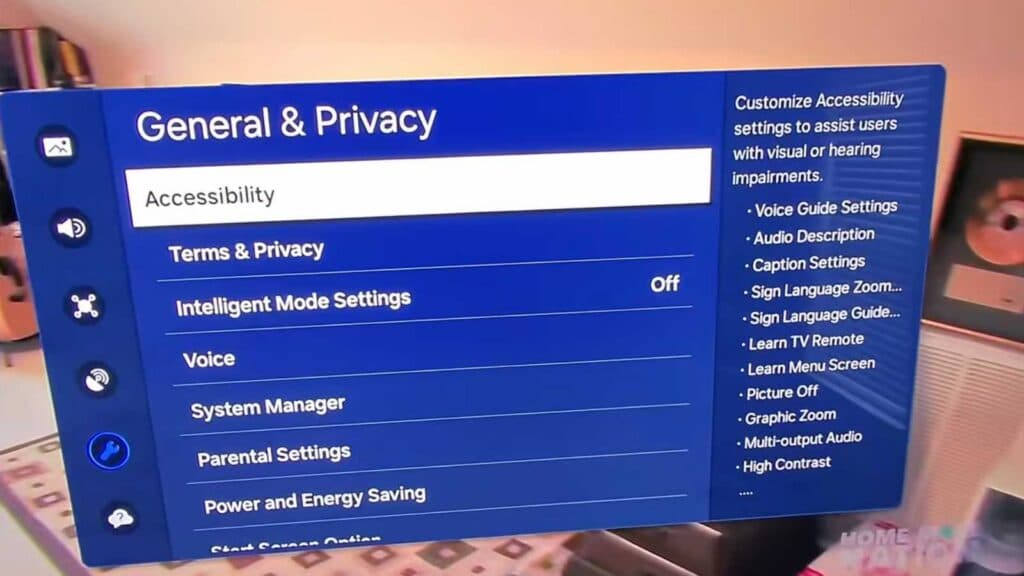
- Select “General and Privacy” from the list. [1:17]
- Open the “Accessibility” menu. [1:27]
- Select “Voice Guide” to toggle the feature off.
Ninja Tip: You can often trigger or disable Voice Guide instantly by holding down the Volume button on your Samsung remote for several seconds, which acts as a quick shortcut to the accessibility menu.
If these steps do not resolve the issue, you can perform a factory reset by navigating to Settings > General > Reset.
Keep Reading



