How to Stop Calls From Ringing on Multiple Apple Devices

By Trae Jacobs,

When you buy through our links, we may earn an affiliate commission.
Your iPhone, Mac, and iPad all ring simultaneously whenever you receive a phone call. You can change your settings to prevent specific devices from ringing.
- Open the Settings app on your iPhone. [0:31]
- Scroll down to select Apps, then search for and open the Phone settings. [0:35]
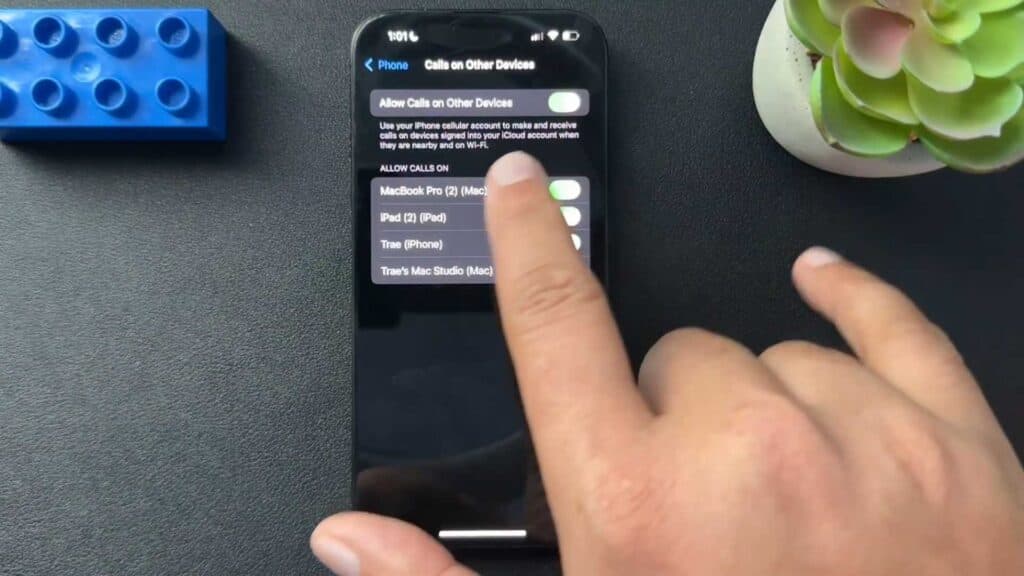
- Scroll down to the Calls section and select Calls on Other Devices. [0:43]
- Toggle off the switches for any specific devices that you do not want to receive calls.
Ninja Tip: If you use Do Not Disturb mode, ensure your focus status is synced across devices or turned off individually if you want calls to ring on one device but not another. You can manage this in Settings > Focus.
If you continue to experience issues with cross-device calling, navigate to Settings > General > Transfer or Reset iPhone to address persistent system synchronization errors.
Keep Reading



