How to Stop Alexa From Talking Back Using Brief Mode

By Trae Jacobs,

When you buy through our links, we may earn an affiliate commission.
Your Amazon Echo device provides long voice responses to every request you make. You can change these settings to make Alexa respond with simple sounds instead.
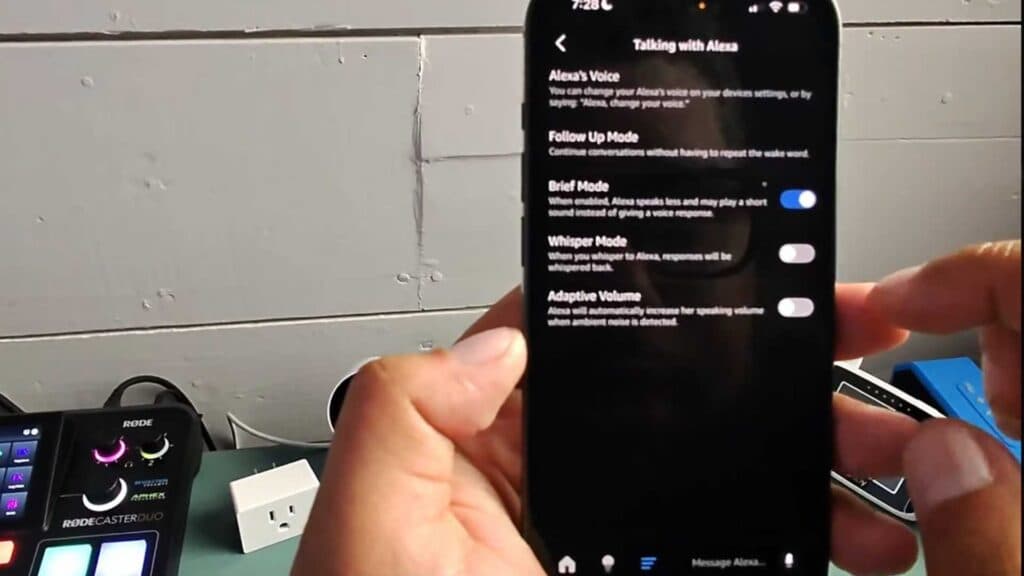
- Enable Brief Mode by simply saying, “Hey Alexa, turn on brief mode” to your device. [0:30]
- Alternatively, open the Alexa app, go to Settings, and scroll down to select Voice Responses. [0:46]
- Toggle the switch for Brief Mode to the on position. [0:56]
- You can also enable Whisper Mode in the same menu if you want your device to respond in a lower volume when you whisper to it.
Ninja Tip: If you want to temporarily silence your Echo without changing settings, say “Alexa, stop” the moment she begins speaking to cut her response short.
For a complete device reset, go to Settings > Device Options > Reset to Factory Defaults.
Keep Reading


