How to Sign Out of Disney Plus on iPhone

By Trae Jacobs,

When you buy through our links, we may earn an affiliate commission.
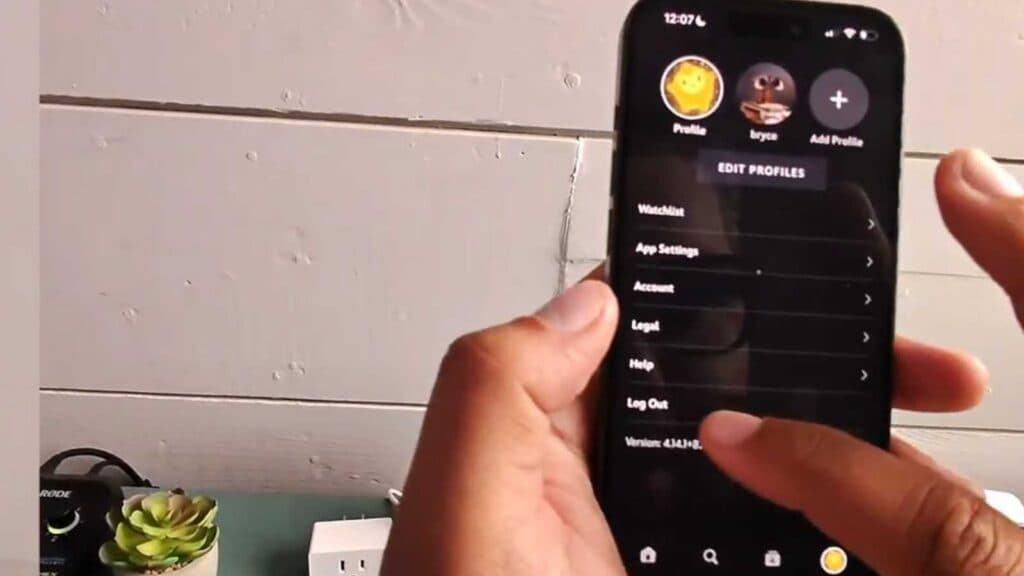
Your Disney Plus account is currently signed into your iPhone. You can follow these steps to sign out of the application.
- Open the Disney Plus app on your iPhone [0:07].
- Tap the profile icon located in the bottom right corner of the screen [0:13].
- Select the “Log Out” button to immediately sign out of your account.
Ninja Tip: If you need to sign out of all devices at once, log into your Disney Plus account through a web browser, go to your Account settings, and select “Log out of all devices.”
If you still cannot access your account, try uninstalling and reinstalling the app from the App Store.
Keep Reading



