How to Scan a QR Code on Your Computer Without a Phone

By Trae Jacobs,

When you buy through our links, we may earn an affiliate commission.
You need to scan a QR code on your desktop but do not have your smartphone available to do it. You can decode these links directly on your computer by using Google Image Search.
- Right-click the QR code you want to scan and select the option to copy the image address [0:19].
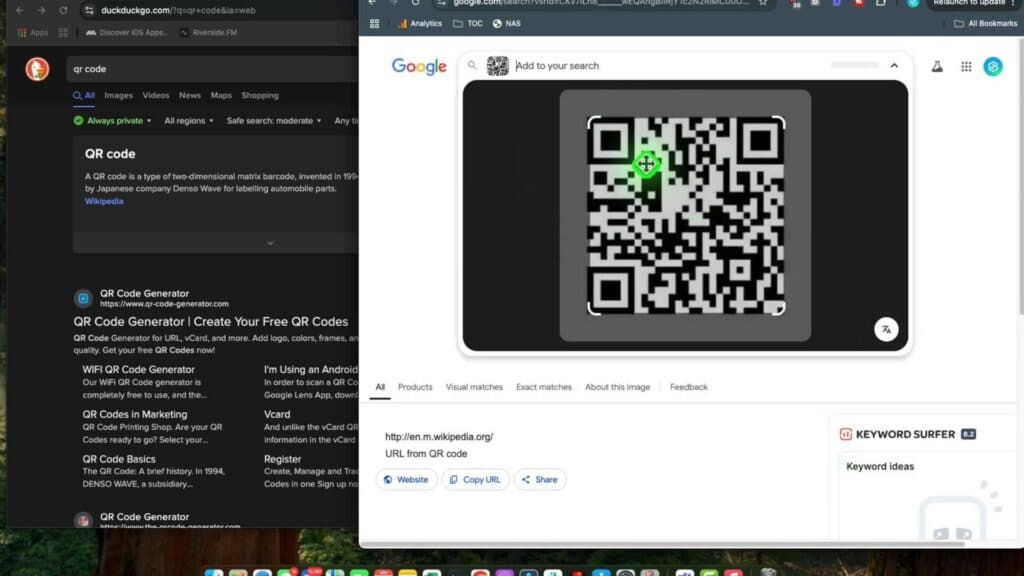
- Go to the Google homepage, click the search by image icon, and paste your copied image link into the provided field [0:26].
- Press search to let Google identify the code and reveal the destination URL, which you can then click to open.
Ninja Tip: If you use the Google Chrome browser, you can right-click any image and select “Search image with Google” from the context menu to bypass manual URL copying. This automatically opens the side panel to show you the source and any embedded links.
If you are unable to scan codes even with this method, check that your browser is updated to the latest version by navigating to Settings > About Chrome.
Keep Reading