How to Fix a Ring Doorbell That Isn’t Detecting Motion

By Trae Jacobs,

When you buy through our links, we may earn an affiliate commission.
Your Ring doorbell is failing to record or notify you when there is motion at your door. You can fix this issue by adjusting your device settings and checking your connection.
- Ensure that motion detection is actually toggled on within your device’s main settings page [0:36].
- Navigate to your motion settings and increase the motion sensitivity slider to a higher level to catch more movement [1:05].
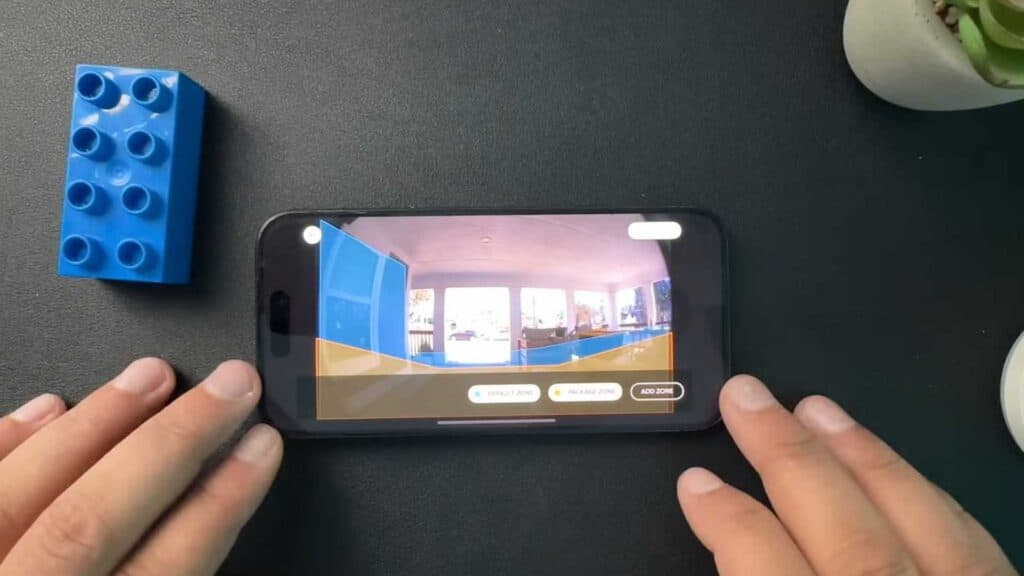
- Select your motion zones and drag the areas to ensure the camera is highlighting the specific zones where you want to detect activity [1:30].
- Check your physical installation to ensure the camera is mounted at the recommended 48-inch height and that no furniture or objects are blocking the lens view [2:29].
- Open your device health menu to check your RSSI signal strength; if your number is 61 or higher, your Wi-Fi is likely too weak for consistent detection [3:28].
- If the device is still unresponsive, perform a reboot by selecting the reboot option in the device health menu.
Ninja Tip: If your RSSI signal is consistently poor even with a chime, check if your router is broadcasting on the 2.4GHz band rather than 5GHz, as the 2.4GHz signal travels much further through exterior walls. You can often force this by setting up a dedicated IoT network or guest network on your router.
If these steps do not resolve the issue, perform a factory reset by holding the setup button on the device for 20 seconds and re-adding it through the Ring app.
Keep Reading


