How to Find and Use the Power Button on a Samsung TV

By Trae Jacobs,

When you buy through our links, we may earn an affiliate commission.
You cannot find the power button on your Samsung TV. You can locate and use the physical controls on your television by following these steps.
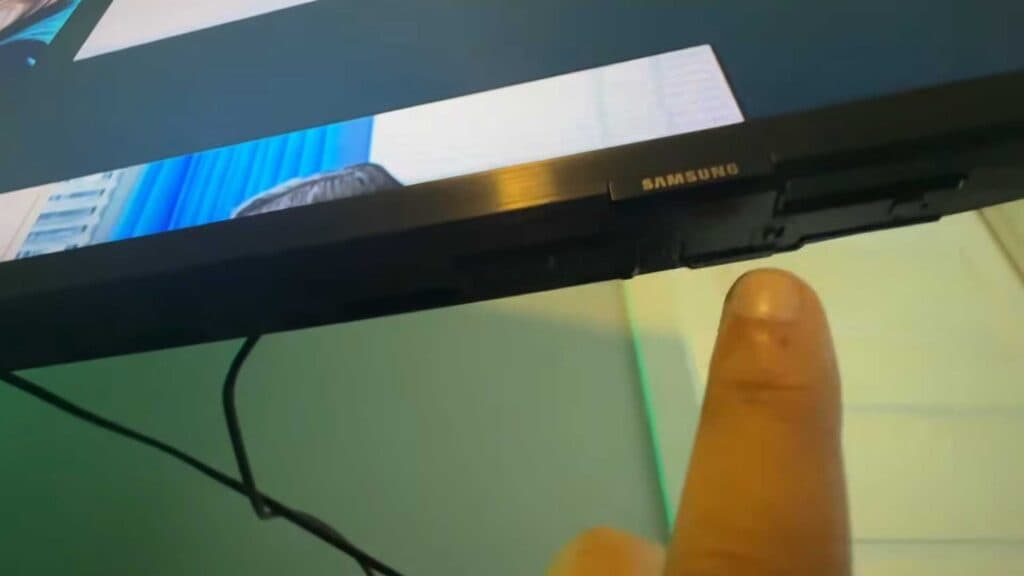
- Locate the manufacturer logo on the front of your TV. Most power buttons are hidden directly underneath this logo [0:16].
- Feel around the bottom edge of the frame below the logo to find the physical button [0:22].
- Press the button once to open the on-screen menu. This menu allows you to power off the device or adjust basic settings without a remote [0:47].
- To navigate the menu options like volume, channel, or source, press the button repeatedly until you highlight your selection.
- Press and hold the button to select an option or to turn the TV off and on.
Ninja Tip: If you have trouble finding the button, try using your smartphone flashlight to look underneath the bottom bezel, as the button is often black and blends into the plastic frame.
If you still encounter issues, you can perform a factory reset by navigating to Settings > General > Reset.
Keep Reading


