How to Factory Reset Your Meta Ray-Ban Glasses

By Trae Jacobs,

When you buy through our links, we may earn an affiliate commission.
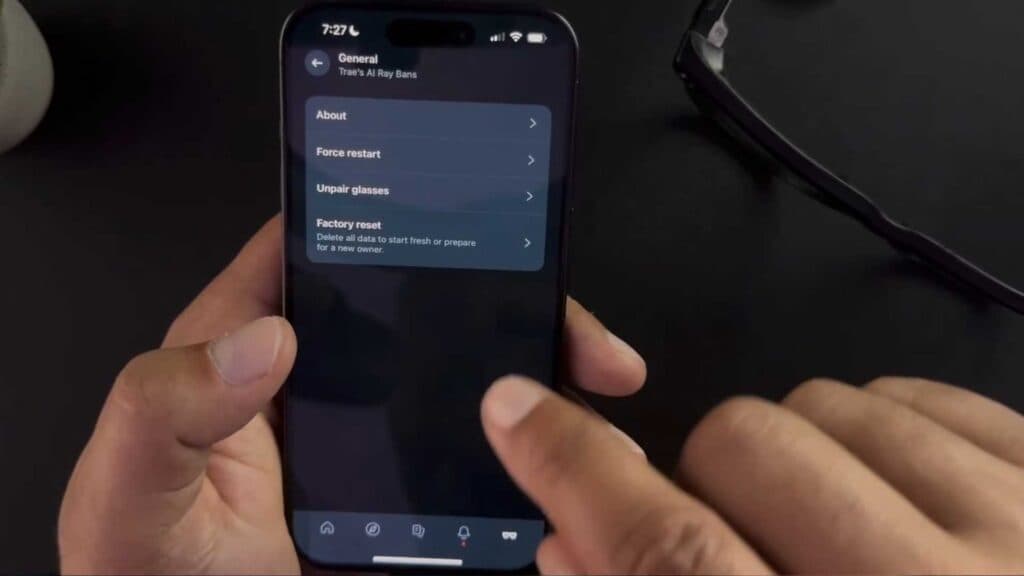
Your Meta Ray-Ban glasses are not working correctly or you need to clear all your data. You can restore them to their original factory settings using the Meta View app.
- Open the Meta View app on your phone and select your glasses from the menu [0:13].
- Navigate to the General settings menu [0:17].
- Select the factory reset option and follow the on-screen prompts to wipe your data [0:19].
Ninja Tip: Before you start the reset, go into your phone’s Bluetooth settings and “forget” or “unpair” your glasses to ensure a clean slate for when you set them up again.
You can perform a factory reset via the Meta View app under your device’s General settings.
Keep Reading



