How to Factory Reset Your Google Nest Mini or Nest Speaker

By Trae Jacobs,

When you buy through our links, we may earn an affiliate commission.
Your Google Nest Mini or Google Nest speaker is not responding to your commands. You can resolve this issue by performing a factory reset.
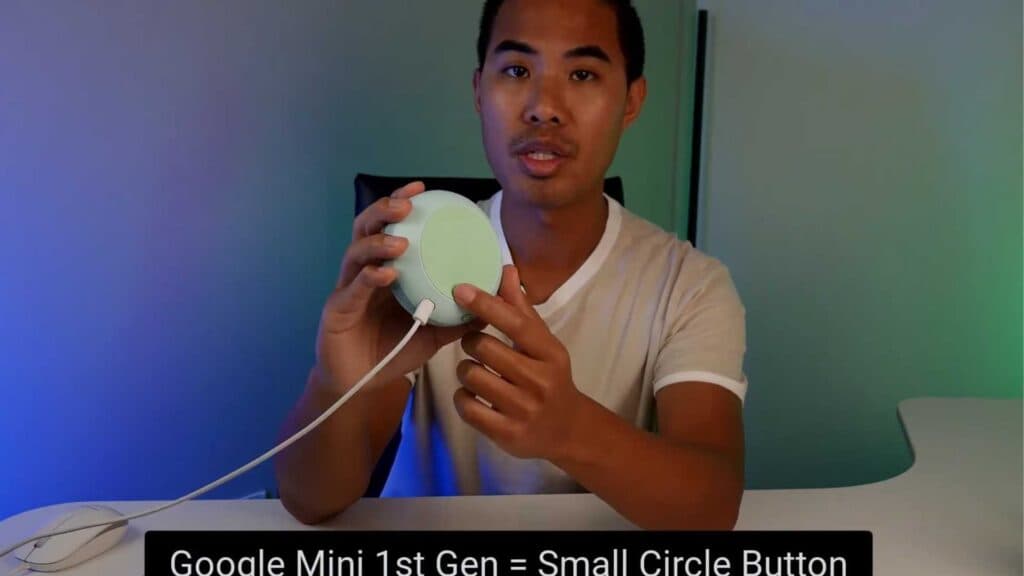
- Identify your device model by looking for a small circle near the power cord or an indentation on the top of the speaker [0:18].
- If you have the first-generation Google Mini, press and hold the small circle underneath the speaker until you hear a confirmation [0:37].
- If you have the second-generation Google Nest, mute the microphone and press down on the top of the speaker until the reset process begins [0:28].
- Wait for all four red lights to illuminate, which signals that the device has been successfully reset.
Ninja Tip: If your speaker still won’t connect after a reset, check that your router is broadcasting a 2.4GHz Wi-Fi signal, as many smart home devices cannot connect to 5GHz networks. You can often split these bands in your router’s wireless settings to ensure compatibility.
Closing: After the reset, open the Google Home app and go to Devices > Add > Set up device to complete the re-installation.
Keep Reading


