How to Extend Your iPhone Battery Life with Optimized Charging

By Trae Jacobs,

When you buy through our links, we may earn an affiliate commission.
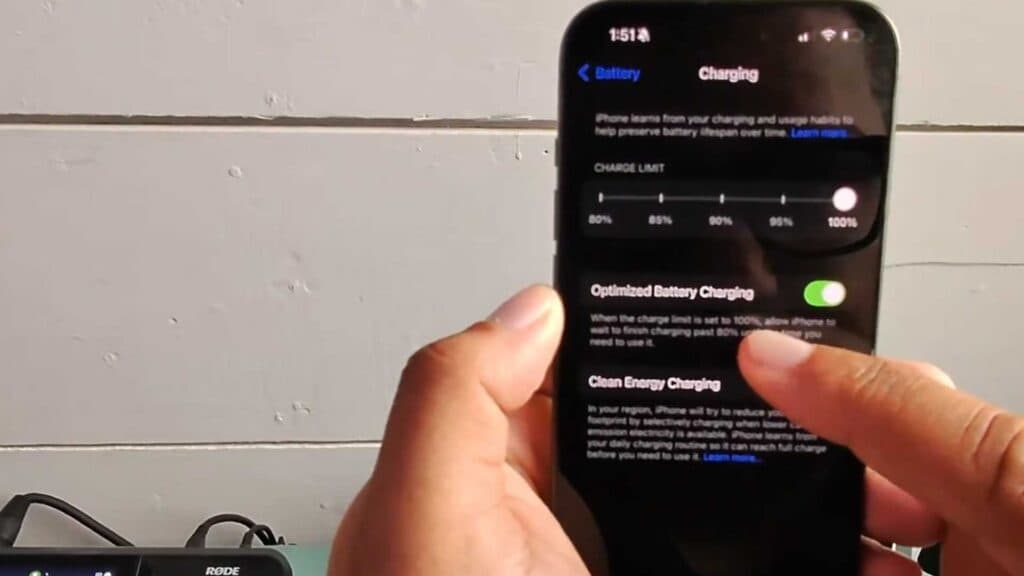
Your iPhone battery capacity degrades over time due to consistent full charging. You can slow this process down by enabling the built-in optimization setting.
- Open the Settings app on your iPhone and scroll down to select Battery [0:44].
- Tap on Charging to access your specific power management options [0:49].
- Turn on the setting that allows your iPhone to learn your routine and wait to finish charging past 80% until you actually need to use it [0:53].
Ninja Tip: Keep your phone out of hot environments like a sunny car dashboard, as extreme heat causes permanent chemical damage to lithium-ion batteries that no software setting can fix.
If you still experience severe battery drain despite these settings, check for hardware issues by going to Settings > General > Transfer or Reset iPhone > Erase All Content and Settings.
Keep Reading



