How to Disable Voice Recognition on Your Samsung Smart TV

By Trae Jacobs,

When you buy through our links, we may earn an affiliate commission.
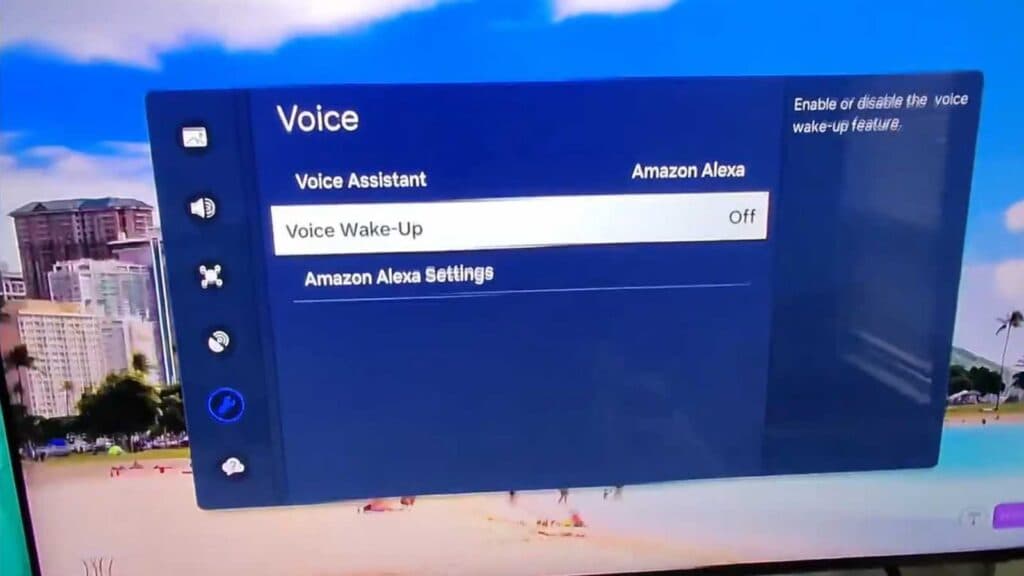
Your Samsung Smart TV is currently listening to your voice to detect wake words. You can turn off this feature to ensure your privacy.
- Check your remote control for a physical switch and turn it off if one exists so it stops listening [0:29].
- Open the TV settings, navigate to General and Privacy, and scroll down to the Voice menu [0:39].
- Toggle off the Voice Wake-up setting to stop the TV from listening for specific trigger words [0:49].
- Select Privacy Choices in the settings menu to manage your voice recognition services and prevent your voice recordings from being sent anywhere.
Ninja Tip: Go into your Samsung account settings on the TV and check your Data Privacy agreement; you can often opt-out of “Interest-Based Advertising” and “Voice Recognition Service” data collection there to further lock down your privacy.
If you continue to experience issues, perform a factory reset by navigating to Settings > General > Reset.
sam
Keep Reading



