How to Disable the Soap Opera Effect on Your LG TV

By Trae Jacobs,

When you buy through our links, we may earn an affiliate commission.
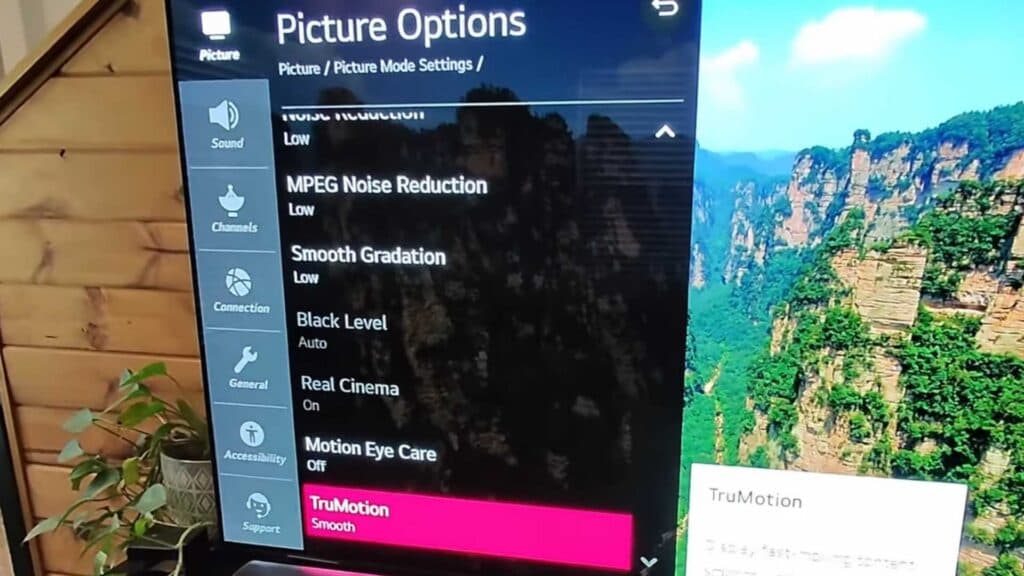
Everything on your screen looks unnaturally smooth or fake. You can fix this by turning off the motion smoothing feature in your TV settings.
- Press the settings button on your remote to open the main menu [0:26].
- Select All Settings from the list [0:31].
- Go to the Picture menu [0:36].
- Open Picture Mode Settings [0:45].
- Scroll down to find and select Picture Options [0:52].
- Select True Motion and toggle it off [0:59].
Ninja Tip: Try switching your picture preset to Filmmaker Mode or Cinema Mode, as these settings automatically disable most artificial post-processing for a more natural look.
If you still run into issues, you can reset your picture settings to their factory defaults by going to Settings > Picture > Reset.
Keep Reading



