How to Disable Auto-Dimming (Motion Lighting) on Samsung TVs

By Trae Jacobs,

When you buy through our links, we may earn an affiliate commission.
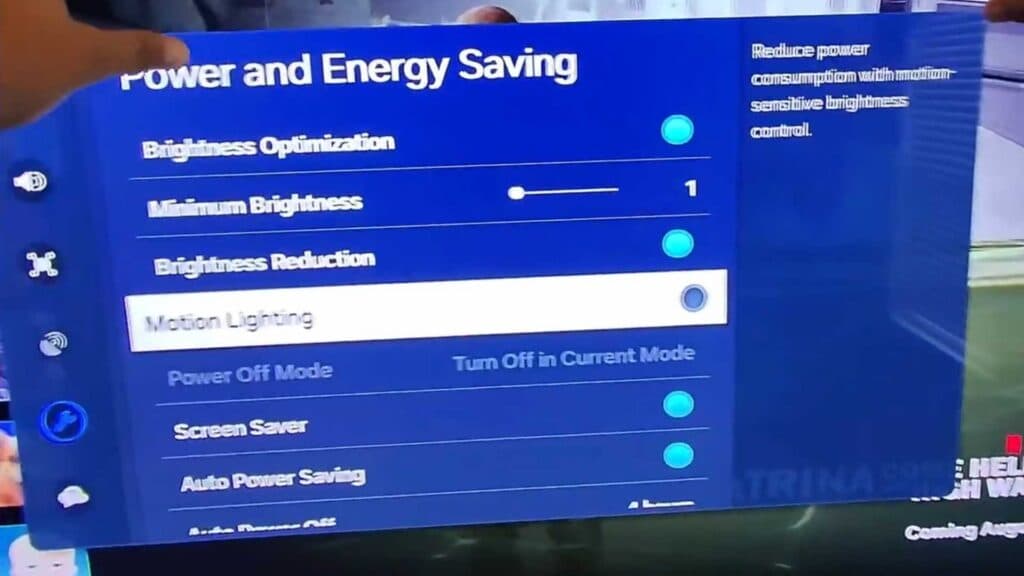
Your Samsung TV screen brightness changes automatically while you watch. You can fix this by adjusting the power settings in your menu.
- Open the Settings menu on your TV. [0:20]
- Navigate to the right and select the Power and Energy menu, which may be labeled as Eco on older models. [0:26]
- Scroll down and select Motion Lighting. [0:43]
- Turn the setting off to stop your TV from automatically adjusting the brightness based on screen motion.
Ninja Tip: Check the Intelligent Mode settings in your general menu as well, as this feature can override manual brightness settings by automatically detecting your room’s light levels.
If the issue persists, you can perform a factory reset by going to Settings > General > Reset.
Keep Reading


