How to Disable Audio Guidance on Your LG TV

By Trae Jacobs,

When you buy through our links, we may earn an affiliate commission.
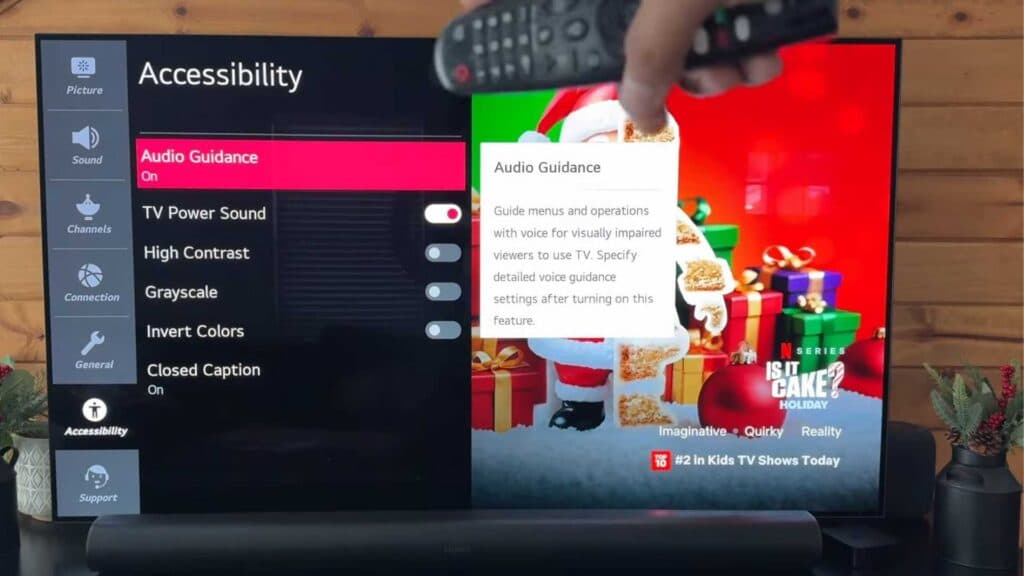
Your LG TV is reading out everything currently on the screen. You can disable this voice feedback by adjusting your accessibility settings.
- Press the Settings button on your remote to open the quick menu [0:21].
- Select All Settings to access the full menu options [0:28].
- Navigate down to the Accessibility menu [0:38].
- Select Audio Guidance and toggle the switch to the Off position [0:44].
Ninja Tip: If the voice continues or you want to prevent accidental reactivation, check the AI Service settings under the main menu to ensure any additional voice recognition features you do not use are also disabled.
If the issue persists, you can perform a factory reset by going to Settings > General > System > Reset to Initial Settings.
Keep Reading


