How to Convert a Google Doc to a Microsoft Word (.docx) File

By Trae Jacobs,

When you buy through our links, we may earn an affiliate commission.
Your Google Doc is currently in a format that you need to open inside Microsoft Word. You can quickly convert and download it as a .docx file to solve this.
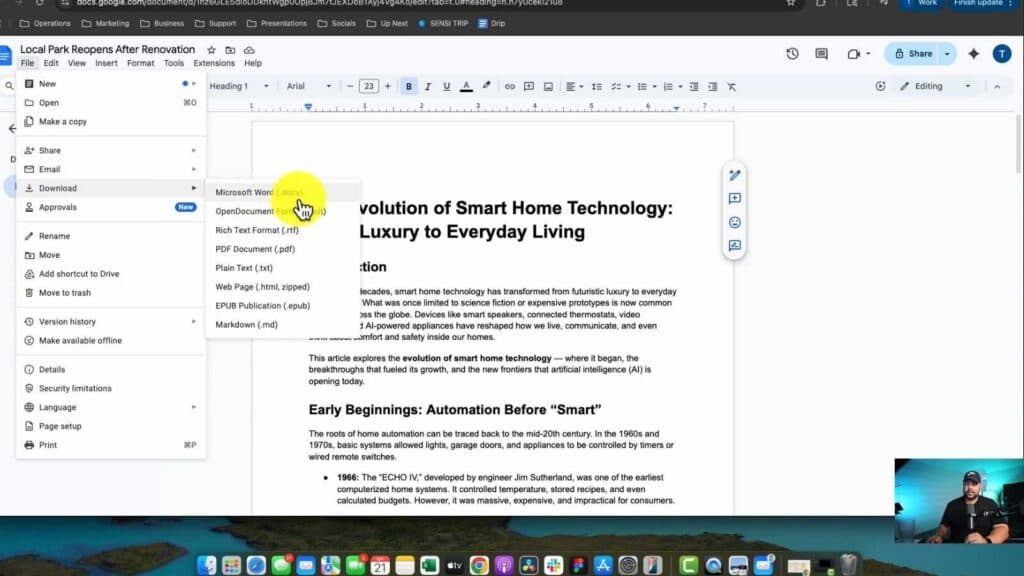
- Open your document in Google Docs, click on File in the top menu, and select Download [0:13].
- Select Microsoft Word (.docx) from the dropdown menu to trigger the download [0:20].
- Locate the file on your computer and move it to your preferred folder, such as your desktop [0:32].
Ninja Tip: If you don’t have Microsoft Word installed, you can upload your saved .docx file to free alternatives like LibreOffice or use the free web-based version of Word via your Microsoft account to view and edit the document without needing the paid software.
If the file fails to open after conversion, ensure your file associations are set correctly in your computer’s settings or try opening it through a cloud-based editor like Google Drive or OneDrive.
Keep Reading



