How to Connect Your Ring Doorbell to Multiple Phones

By Trae Jacobs,

When you buy through our links, we may earn an affiliate commission.
Your household members currently lack access to your Ring doorbell notifications and live video. You can easily grant them access by adding them as a shared user within your existing Ring setup.
- Open the Ring app on the admin account that holds full permissions [0:46].
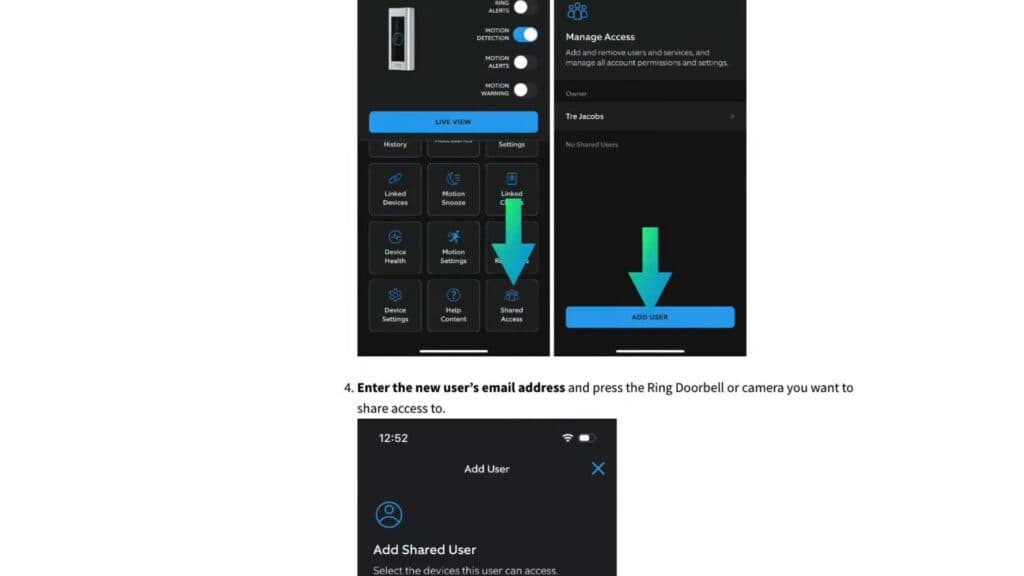
- Navigate to the Device Settings menu and tap on Shared Access to manage your user list [0:53].
- Select Add User at the bottom of the screen to start the invitation process [1:08].
- Enter the email address for the person you want to invite and choose which devices they can access [1:16].
- Once the invite is sent, have the recipient open their email and accept the invitation to join your system [2:32].
- The new user should now log in to their own Ring account on their phone to see the shared cameras [3:06].
Ninja Tip: If the invited person is not seeing the cameras after accepting, have them log out and log back in to the app to force a refresh of their permissions.
If you ever need to start fresh, you can remove a device entirely by going to Settings > General Settings > Remove this Device.
Keep Reading

