How to Connect Your LG TV to Wi-Fi

By Trae Jacobs,

When you buy through our links, we may earn an affiliate commission.
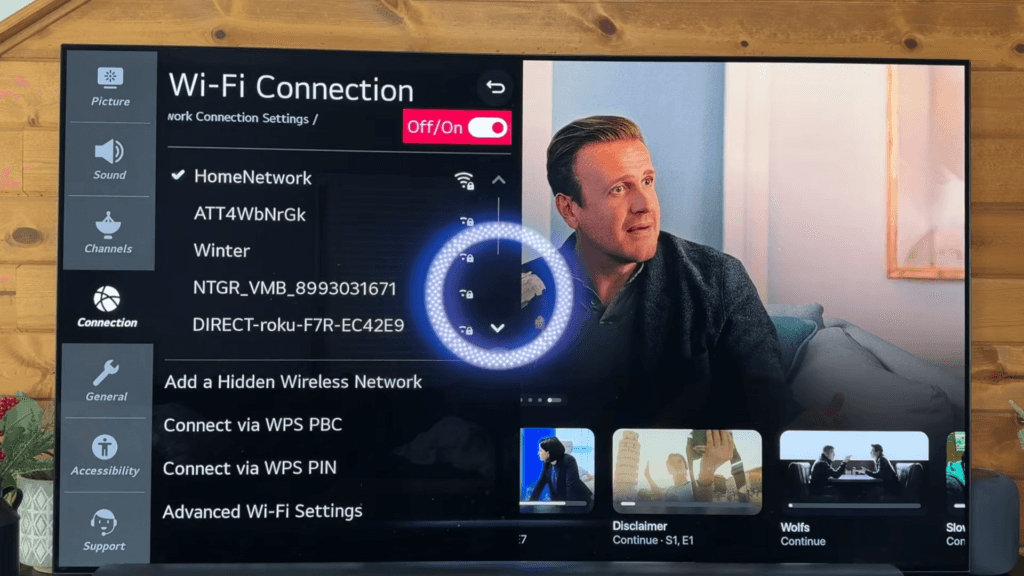
Your LG TV is currently disconnected from the internet. You can resolve this issue by following the network configuration steps below.
- Press the settings gear icon located in the upper right corner of your screen. [0:11]
- Scroll down the menu and select the Network option. [0:18]
- Select Wi-Fi and ensure the toggle switch is turned on. [0:31]
- Choose your home network from the list and enter your password. [0:53]
- Select the connect button to finalize the setup.
Ninja Tip: If your TV struggles to maintain a connection, try changing your router’s Wi-Fi channel to a less crowded frequency or move the router closer to the television to reduce signal interference.
If you continue to experience connectivity issues, navigate to Settings > General > System > Reset to Initial Settings.
Keep Reading


