How to Change the Batteries in Your Nest x Yale Lock

By Trae Jacobs,

When you buy through our links, we may earn an affiliate commission.
Your Nest x Yale lock has dead batteries. You can replace them quickly by following these steps.
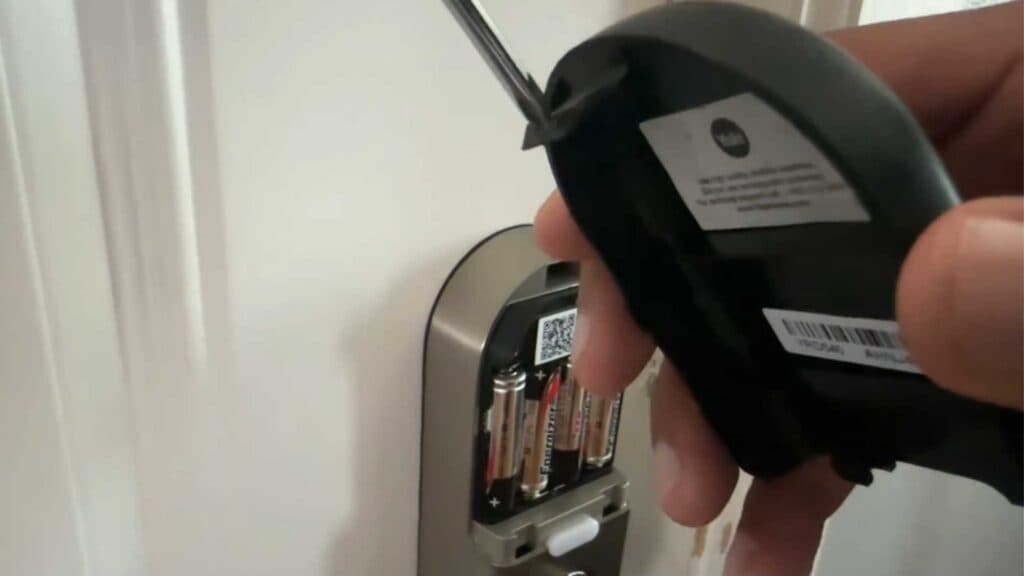
- Use a thin object, like a small screwdriver, to push into the small opening at the top of the interior lock assembly [0:41].
- Lightly push the release clip down while pulling the black battery cover away from the unit to remove it [0:48].
- Replace the old batteries with a fresh set of AA batteries [1:13].
- Align the two bottom clips on the cover with the corresponding holes and push the cover shut until it clicks into place.
Ninja Tip: When replacing your batteries, use high-quality lithium or alkaline AA batteries to ensure the longest possible lifespan for your smart lock. Avoid mixing old and new batteries to prevent leaking and inconsistent power delivery.
If the lock still does not respond after replacing the batteries, perform a factory reset by holding the reset button located on the interior lock module while reinserting the batteries.
Keep Reading



