How to Change Page Margins in Google Docs

By Sameer,

When you buy through our links, we may earn an affiliate commission.
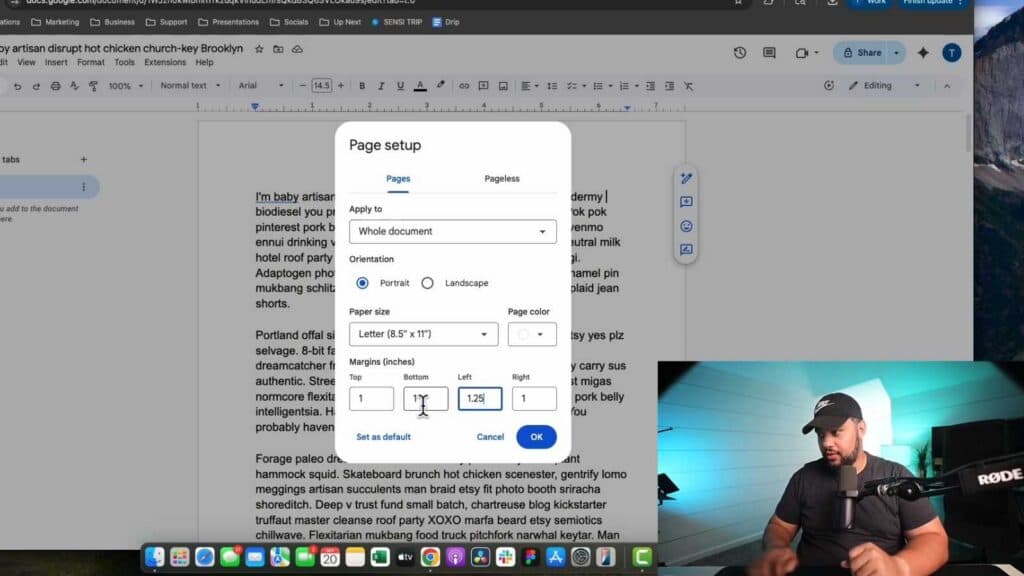
Your Google Docs document has incorrect page margins that don’t fit your layout requirements. You can adjust these settings to specific measurements using the Page Setup menu.
- Click on the “File” menu in the top toolbar and select “Page setup” from the dropdown list. [0:49]
- Enter your preferred measurements in inches for the top, bottom, left, and right margins. [0:57]
- Click “OK” to apply these changes to your current document. [1:04]
- To make these new margins your default for all future documents, go back to the Page setup menu and click “Set as default.“
Ninja Tip: You can also adjust your margins visually by clicking and dragging the gray markers on the horizontal and vertical rulers displayed at the top and side of your document page.
If you need to revert to the original settings, go to File > Page setup and reset the margins to one inch.
Keep Reading



