How to Cancel Roku Subscriptions on Your TV and Website

By Trae Jacobs,

When you buy through our links, we may earn an affiliate commission.
You are being charged for a Roku subscription you no longer want. You can stop these recurring payments by following these steps to turn off auto-renew.
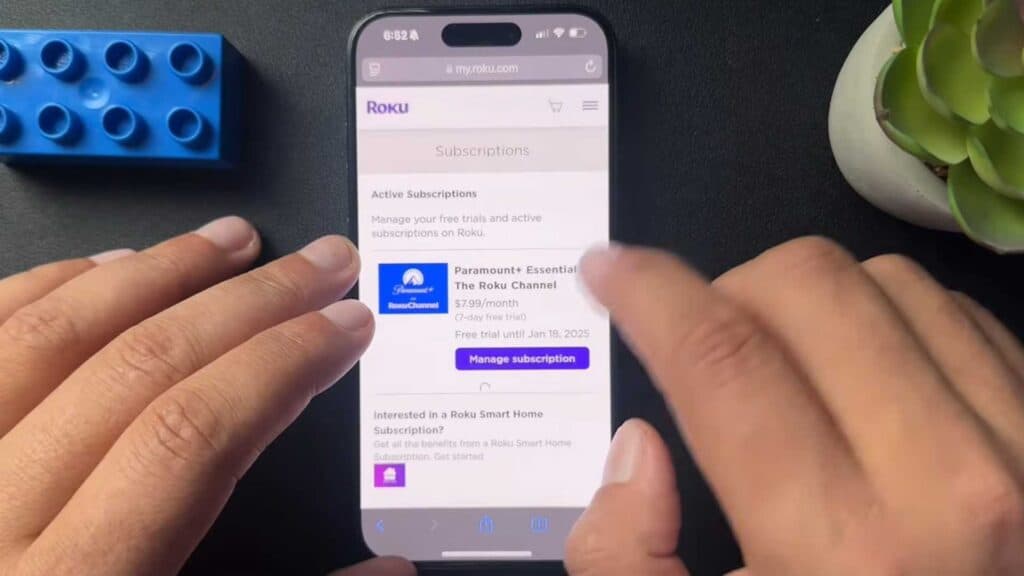
- Sign in to your account at Roku.com and click the menu button to open your account page [0:33].
- Scroll down to “My subscriptions” and select “Manage subscriptions” [0:46].
- Select “Turn off auto-renew” and confirm your choice to cancel the service [0:53].
- If you prefer to use your remote, go to the Roku home screen, highlight the app you want to cancel, and press the star button on your remote [1:49].
- Select “Manage subscription” from the menu, choose “Turn off auto-renew,” and confirm the cancellation.
Ninja Tip: Even after you cancel, you will usually keep access to the channel’s content until the end of your current billing cycle. Check your email for a confirmation message from Roku to ensure the cancellation went through correctly.
If you still see unwanted charges after canceling, you can factory reset your device by going to Settings > System > Advanced system settings > Factory reset.
Keep Reading

