How to Add Delivery Instructions to Your Amazon Account

By Trae Jacobs,

When you buy through our links, we may earn an affiliate commission.
Your Amazon delivery driver leaves packages in the wrong spot or fails to follow your entry preferences. You can update your account settings to provide specific instructions for every delivery at your address.
- Open the Amazon app, tap the menu icon represented by three dots, and select the Account section [0:43].
- Navigate to your address list and select the specific address you want to edit [0:51].
- Scroll to the bottom of the address details and select the option to add delivery instructions [1:07].
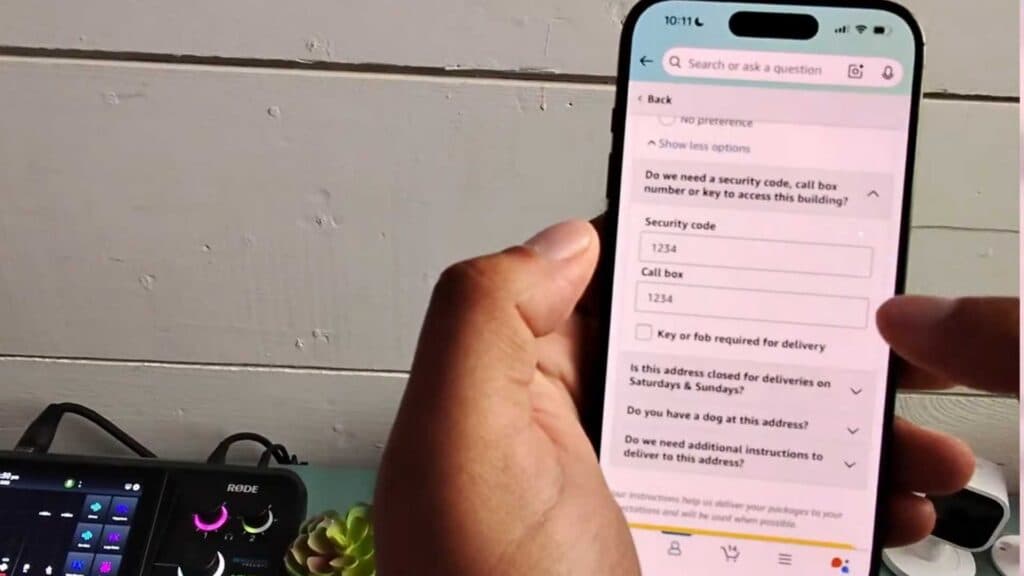
- Enter your specific property details, such as security codes, callbox numbers, or your preferred drop-off location [1:15].
- Select your property type from the available list, including options for houses, apartments, or businesses [1:32].
- Enter any additional text notes for the driver in the designated box before saving your instructions.
Ninja Tip: If you frequently receive packages when you aren’t home, consider setting up an Amazon Locker location as your primary address to ensure your order is stored securely until you can pick it up. This is often the most reliable way to prevent theft or misplacement in apartment buildings or busy neighborhoods.
If the delivery issues persist despite these updates, you can remove and re-add your address information by going to Account > Your Addresses > Remove.


